

In a RAID environment staff needs to have extensive, specialized training and be fully familiar with RAID BIOS, creating, allocating disks to arrays, deleting and rebuilding arrays. RAID arrays are sensitive beasts.
RAID was designed for a server environment where any software that is installed on the system is:
- Generally server grade software & validated for use on that configuration
- Installed by professional IT personnel
RAID users are less likely to take regular backups or clone their system. Complacency appears to set in when there is the perceived security of a mirrored drive. There's the assumption that come what may, a backup exists. RAID is no substitute for a schedule of regular cloning and/or imaging.
Pitfalls of RAID
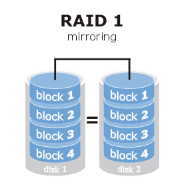
RAID 1 does not protect against errors. It protects only against one disk going faulty. RAID 1 will duplicate the errors. RAID 1 maintains a faithful copy on the second disk of everything that’s on the first:
- Mistakes made
- Files irrecoverably deleted
- Virus caused issues
- File shredding
- Flashing the BIOS
- Resetting the BIOS
- Updating firmware
- Disk managers
- Hard disk utilities
- Imaging and partitioning
The RAID BIOS can lose the information it stores to track the allocation of the drives and cause the array to fail. This can be caused by all manner of software particularly anti-virus programs. Also, the RAID controller driver can become corrupt.
Reinstalling operating systems on top of existing installations or trying to repair a Windows installation by reinstalling the OS can cause problems.
You are relying on the RAID controller for error correction and array management yet most onboard RAID controllers are of the lowest quality.
RAID - Not such a clever idea for your home or business computer
Get Crash Ready! A “Clone”
will provide a fully functional recovery in
20 minutes versus 2 weeks!
Contact us for more information.
